General Firewall Configuration Instructions on Donyx
The firewall on Donyx routers is based on the iptables software. The configuration interface provides comprehensive access to iptables rule management.
| Documentation regarding iptables configuration is available at the following link: netfilter.org/documentation |
Core Concepts
-
Interfaces — Logical network entities, such as the local network, wired service provider connection (WAN), cellular modem connection, and Wi-Fi client connection.
-
Zones — Groups of interfaces designed to simplify management. For example, zone-wan aggregates "upstream" interfaces, while zone-lan includes the local network and equivalent connections (e.g., tunnels).
-
Chains — Ordered lists of rules used to process packets. Each chain is associated with a specific stage of packet processing within the network stack.
-
Tables — Logical groupings of chains used to organize related packet operations.
The NAT table is utilized for configuring port forwarding.
Port Forwarding for a Local Network Device
Objective:
To establish port forwarding for port 80 (HTTP) to a local device assigned the IP address 192.168.1.100.
Procedure:
-
Navigate to the /firewall/nat section. Click Add, select prerouting as the Chain, and click OK.

-
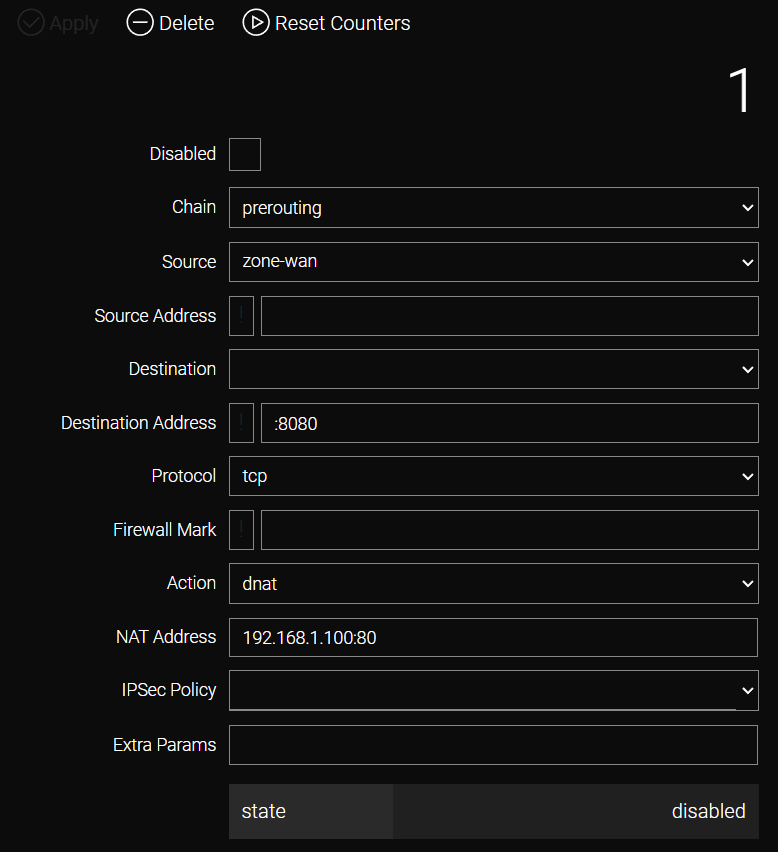
The general iptables rule configuration form will be displayed. The available fields depend on the selected table and the actions being configured.
-
Configure the rule parameters using the following table as a reference:
Field |
Description |
Example Value |
Chain |
The chain to which the rule is added. |
prerouting |
Source |
Packet source (interface or zone). |
zone-wan |
Source Address |
Source IP address (prefix ! indicates logical NOT). |
– |
Destination |
Packet destination (interface or zone). |
– |
Destination Address |
Destination IP address or port (prefix ! indicates logical NOT). |
:8080 |
Protocol |
Protocol to which the rule applies. |
tcp |
Firewall Mark |
Firewall mark identifier (for advanced rules). |
– |
Action |
Action performed on the packet (depends on the selected table). |
dnat |
NAT Address |
The destination IP address and port for the forwarding operation. |
192.168.1.100:80 |
Ipsec Policy |
IPsec policy matching. |
– |
Extra Params |
Additional technical parameters (for advanced rules). |
– |
-
Click Apply.
With this configuration, port forwarding is established from router port 8080 to port 80 of the IP address 192.168.1.100. This setup functions correctly provided the local network device is configured to use the Donyx router as its default gateway.
Port Forwarding for Devices without a Default Gateway
In scenarios where network devices are statically configured without a specified gateway address, or if the gateway cannot be defined, standard port forwarding will not function. In such cases, an additional SNAT rule is required.
To configure this, navigate to the /firewall/nat section, click Add, select postrouting as the Chain, and click OK.

Configure the parameters according to the following example:
-
Chain: postrouting
-
Destination: zone-lan (if only one local network exists) or the specific bridge identifier (e.g., bridge0) to which the target device is connected.
-
Protocol: tcp
-
Action: snat (Source NAT)
-
NAT Address: 192.168.12.1 (the local IP address of the router serving as the gateway)
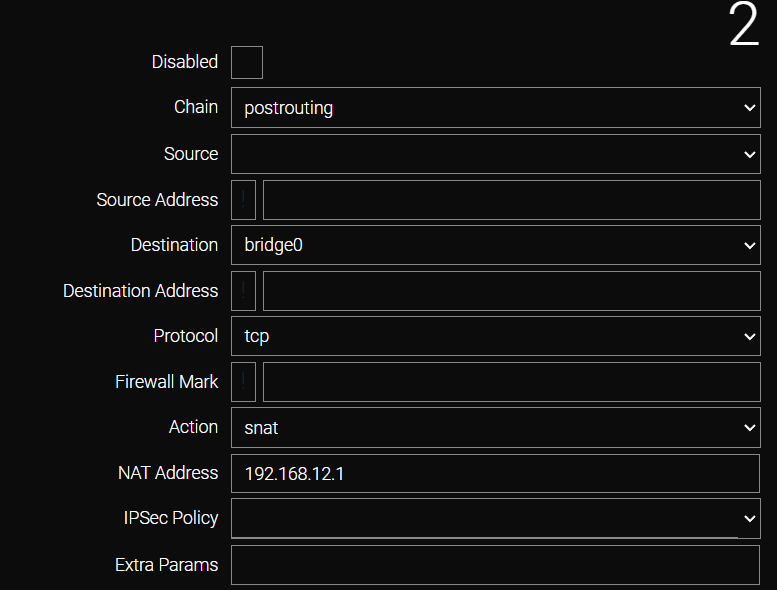
The rule will be applied to all devices and addresses within the selected zone or bridge.
| Alternatively, the specific IP address of the target device (e.g., 192.168.1.100) may be entered in the Destination Address field. In this scenario, the rule applies exclusively to that device, and the Destination field remains optional. |
CLI Configuration
| Parameters with the value - can be omitted. |
To add a DNAT rule:
/firewall nat add chain=prerouting
    action dnat
    disabled -
    dst -
    dst-addr :8080
    extra -
    mark -
    nat-addr 192.168.1.100:80
    policy -
    protocol tcp
    src zone-wan
    src-addr -
To add an SNAT rule (optional):
  /firewall nat add chain=postrouting
    action snat
    disabled -
    dst zone-lan
    dst-addr -
    extra -
    mark -
    nat-addr 192.168.12.1
    policy -
    protocol tcp
    src -
    src-addr -

  /firewall nat apply
Port Forwarding for All Protocols to an Internal Device
In scenarios where comprehensive external access to an internal network device is required and routing or tunneling cannot be established, DNAT can be configured for all protocols and ports simultaneously.
To implement this, select all in the Protocol field during rule creation. Specifying a port in the NAT Address field is not required in this mode.
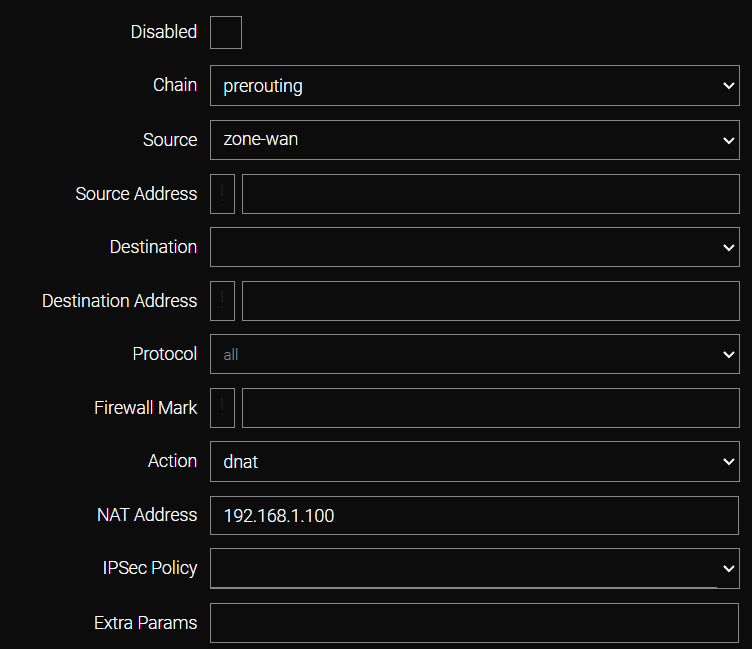
Prior to this, additional DNAT rules must be created to forward ports for the router’s own services (e.g., port 80 for the admin interface and port 22 for SSH) according to the provided template.
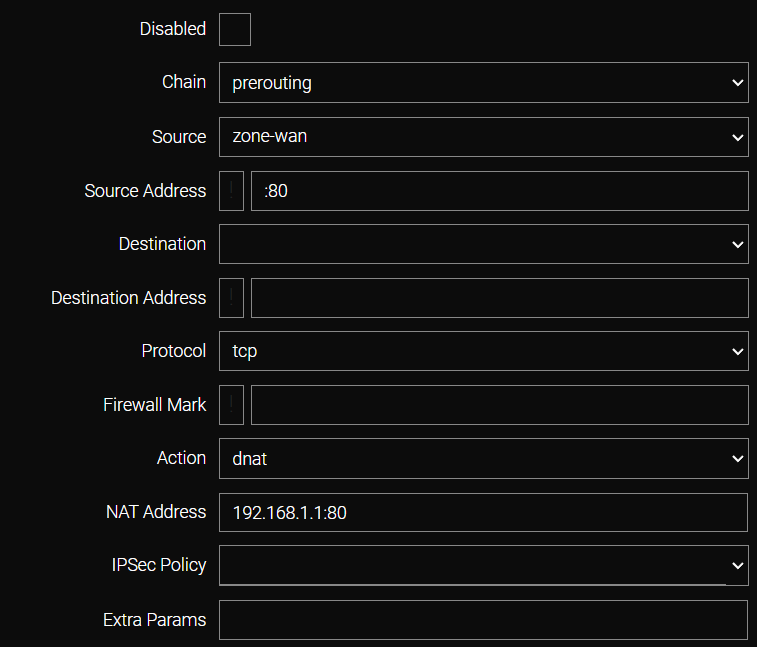
An incorrect rule order may result in the loss of external access to the router.
| In this configuration, the target host is not protected by the router’s internal firewall. |
CLI Configuration
| Assumes the internal IP address is 192.168.1.1. |
Configuring access to the administration panel:
/firewall nat add chain=prerouting
    action dnat
    disabled -
    dst -
    dst-addr :80
    extra -
    mark -
    nat-addr 192.168.1.1:80
    policy -
    protocol tcp
    src zone-wan
    src-addr -
    apply
Configuring SSH access:
 /firewall nat add chain=prerouting
    action dnat
    disabled -
    dst -
    dst-addr :22
    extra -
    mark -
    nat-addr 192.168.1.1:22
    policy -
    protocol tcp
    src zone-wan
    src-addr -
    apply
Configuring Full DNAT for IP 192.168.1.100:
  /firewall nat add chain=prerouting
    action dnat
    disabled -
    dst -
    dst-addr -
    extra -
    mark -
    nat-addr 192.168.1.100
    policy -
    protocol all
    src zone-wan
    src-addr -
    apply

  /firewall nat apply
Opening Router Ports for Specific Services
To open a specific port (e.g., TCP 1723 for PPTP), a rule must be created in the /firewall/filter section.

Complete the corresponding fields.
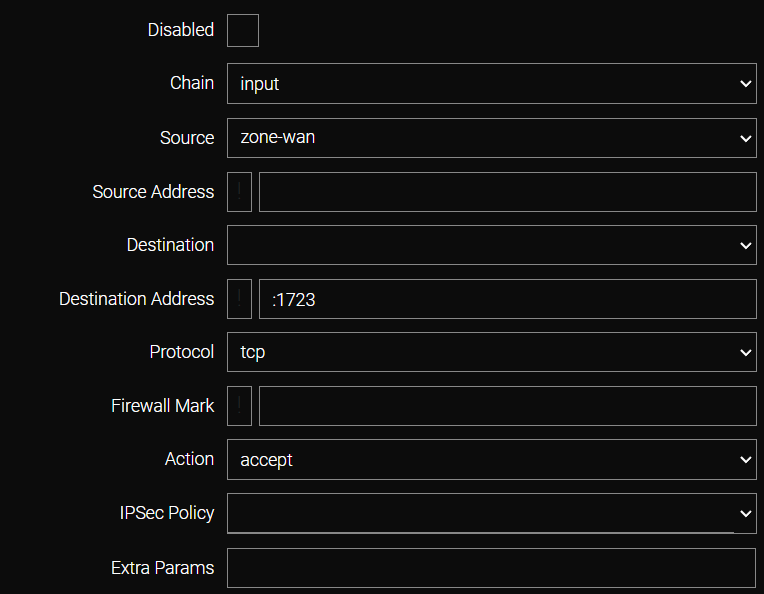
| A newly created rule is placed at the end of the list, below the general deny rule, and will not take effect. It must be moved above the deny rule to function correctly. |
Zone Configuration
A fundamental concept in firewall management is the Zone. A zone is a logical grouping of interfaces or IP addresses that simplifies rule administration by eliminating the need for redundant rules across multiple interfaces.
The system includes two pre-configured zones: zone-lan (local network) and zone-wan (interfaces directed toward the service provider).
By default, interfaces that are not assigned to a zone (e.g., certain tunnels) are not processed by the firewall unless specific rules are explicitly configured for them.
To add an interface to a zone, click on the zone name and select the desired interface from the Entry list.
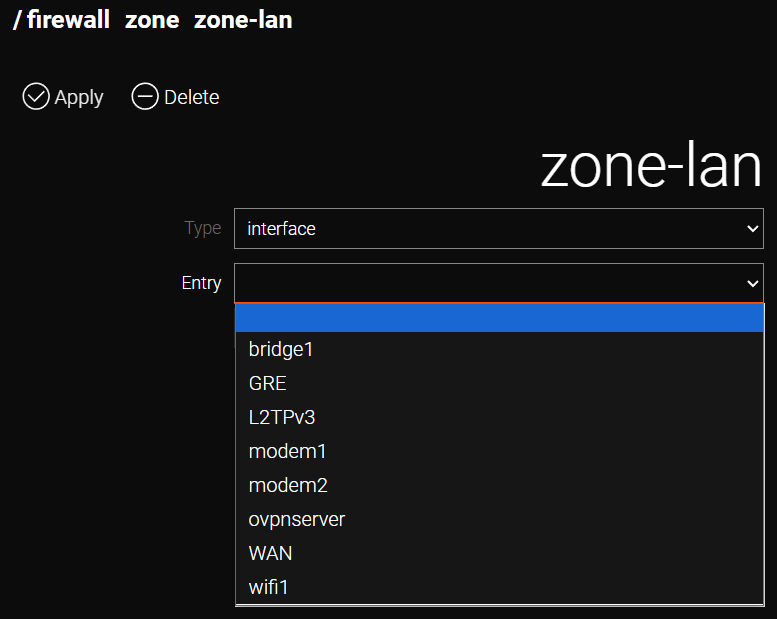
A zone may also consist of a specific set of IP addresses. To create such a zone, navigate to the /firewall/zone section and click Add.
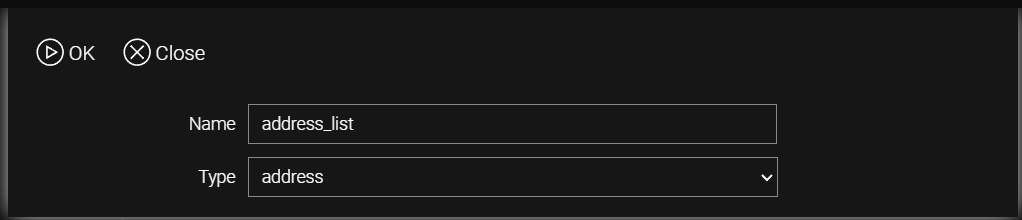
Configure the following parameters:
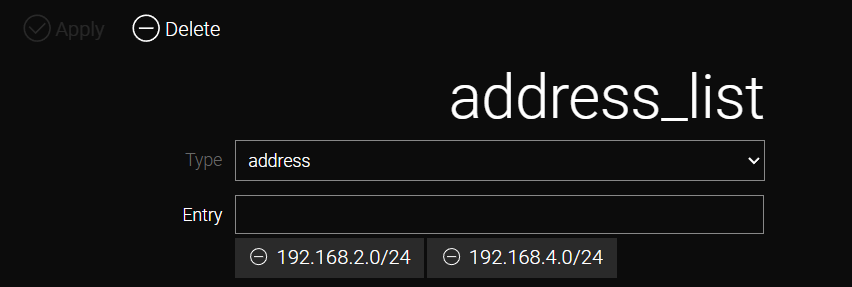
This zone can now be utilized during firewall rule creation; the rules will apply exclusively to packets with addresses belonging to this zone.