Configuring Port Forwarding on Donyx Routers with Multiple Service Providers
If a router utilizes connection methods from two different providers – such as a cellular network and wired Internet, or a cellular network and Wi-Fi – configuring a DNAT rule alone is insufficient for port forwarding. According to routing principles, return traffic from a device behind NAT is directed via the Default Route. If the initial traffic arrived through an interface with a higher metric, this results in service unreachability. To ensure the reachability of a device behind NAT, incoming traffic must be marked, with return packets routed back to the original sender based on these marks.
Configuration Overview
-
Primary WAN Interface: Wired connection.
-
Backup Interface: Cellular connection (sim1).
-
Local Server: Located at 192.168.1.100, listening on port 80.
Both interfaces are assigned public static IP addresses and are accessible via the Internet. Port 8000 will be published for external access.
Step 1
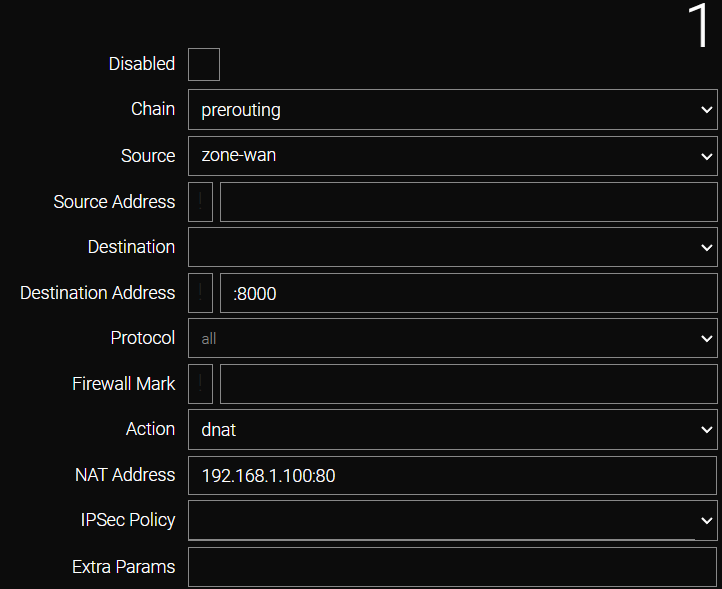
Create a DNAT rule in the /firewall/nat section by clicking Add and selecting prerouting as the Chain.

Complete the form as shown in the example:
-
In the Source list, select zone-wan.
-
In the Destination Address field, specify port 8000 (entered as :8000).
-
In the Action list, select dnat.
-
In the NAT Address field, specify the IP address and port of the destination node: 192.168.1.100:80.
Click Apply.
Step 2
Mark incoming traffic originating from the interface with the higher metric (lower priority).
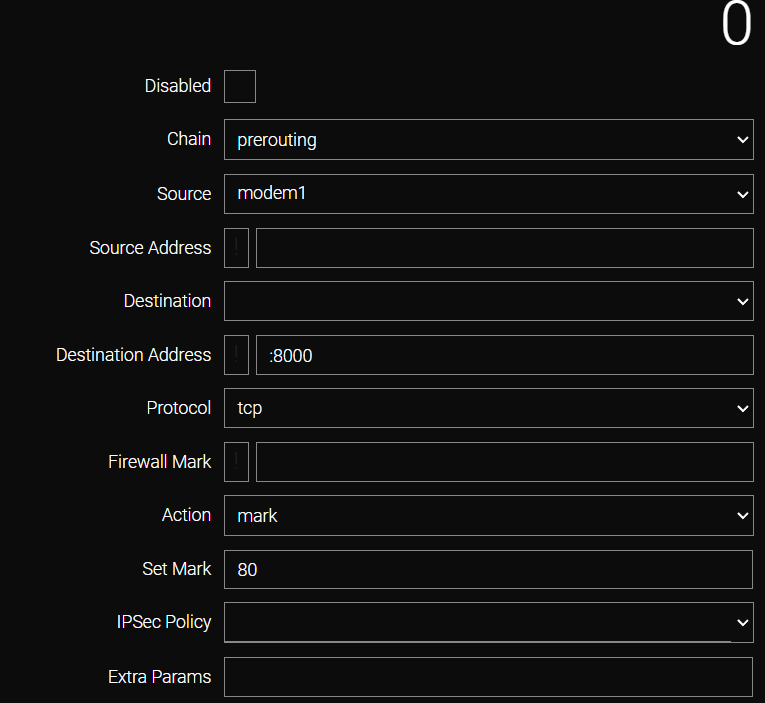
Navigate to the /firewall/mangle section, click Add, and select prerouting as the Chain.

Complete the form with the following parameters:
-
Source: Specify the interface with the higher metric (lower priority). If the wired channel is primary, select the cellular interface (e.g., modem1).
-
Destination Address: Specify port 8000 (the external port being forwarded).
-
Protocol: Select tcp.
-
Action: Select mark.
-
Set Mark: Enter the mark value (e.g., 80).
Click Apply.
Step 3
Configure routing to ensure that marked return packets are directed to the correct interface.
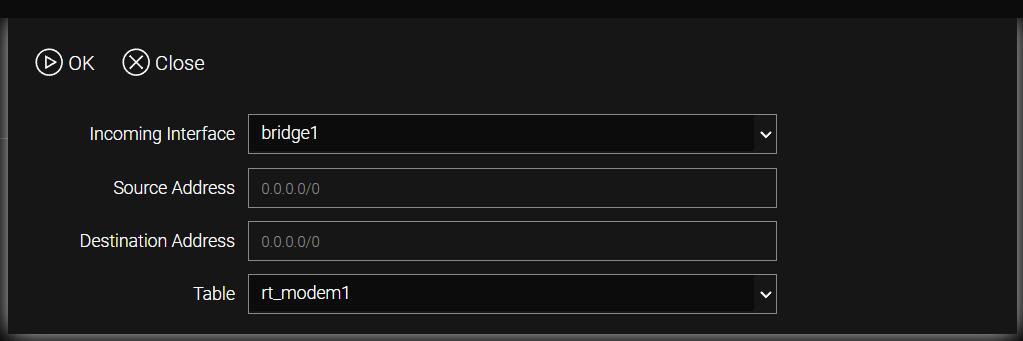
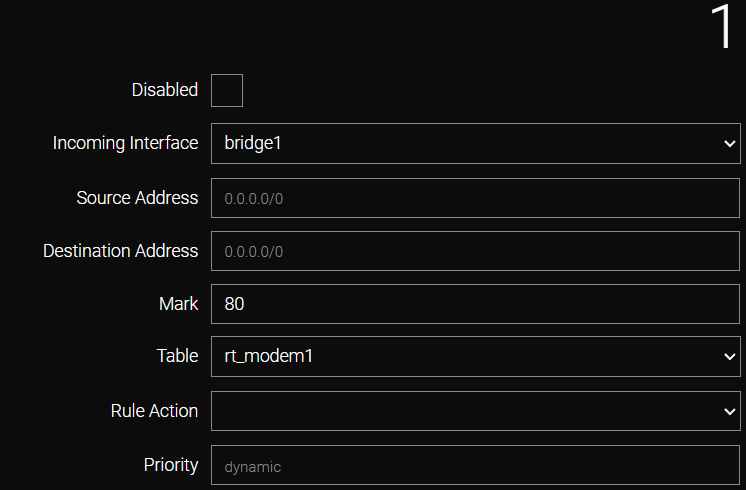
In the /ip/route/rule section, click Add. Complete the form as shown in the example:
-
In the pop-up panel, select the bridge interface serving the local network from the Incoming Interface list.
-
In the Table list, select rt_modem1 (corresponding to the modem1 interface) and click OK.
In the displayed form, specify the previously configured mark value in the Mark field and click Apply.
| All modifications are permanently saved to the router configuration only after executing the /system config commit command or clicking the commit button in the web interface. |
CLI Configuration
-
DNAT rule creation.
/firewall nat add chain=prerouting
    action dnat
    dst-addr :8000
    nat-addr 192.168.1.100:80
    protocol tcp
    src zone-wan
apply-
Packet marking.
/firewall mangle add chain=prerouting
    action mark
    dst-addr :8000
    protocol tcp
    set-mark 80
    src modem1
apply-
Routing configuration.
/ip route rule add table=rt_modem1
    dst-addr 0.0.0.0/0
    interface bridge1
    mark 80
    src-addr 0.0.0.0/0
apply| All modifications are permanently saved to the router configuration only after executing the /system config commit command or clicking the commit button in the web interface. |